Why the chat window is closing: Anticipatory AI interfaces and what users want

Senior Product Designer, TELUS Digital

Lead Product Researcher, TELUS Digital

Design Lead, TELUS Digital

Key takeaways
- Chat interfaces put the cognitive burden on the user. Anticipatory interfaces flip that equation by surfacing what users need before they think to ask.
- Agentic AI and GenUI provide the infrastructure for the experience goal of an anticipatory interface.
- Anticipatory interfaces are built on five foundational layers: signals and context, user data, third-party integrations, design systems and agentic execution.
- TELUS Digital research found that users don't maintain one interaction style throughout a session. The same person who delegates a routine expense report in the morning may want full oversight when reviewing a contract that afternoon.
- User trust requires transparency that runs ahead of the action, including approval moments, confidence indicators and a clear way to reverse what the system has done.
Picture the moment just before you type into a chat box, when everything pauses while you think of what to ask. That pause is a design failure, one that puts the burden back on the user, in a market where the cost of that friction is rising.
The GenUI ecosystem, the emerging stack of tools, standards and platforms enabling AI-generated interfaces, is accelerating faster than most product roadmaps. With it, users are noticing that chat is just a pitstop on the way to something far more powerful: an interface that knows what you need and acts before you think to ask.
Starbucks and Wyndham Hotels are already building on the ChatGPT Apps SDK, letting customers place orders and book rooms through ChatGPT's multimodal interface. That's one path forward. But routing customer interactions through an external AI platform means ceding data, context and relationship control to a third party. Building an anticipatory experience inside a brand's own product is how enterprises can protect what matters most: customer data, behavioral history and relationship control.
As users become more accustomed to AI personalization and multimodal interfaces, the brands that ask them to revert to a blank box won’t keep them long. In this article, we'll make the case for why anticipatory AI interfaces are essential for customer retention and what it takes to build them.
What Clippy taught us
Microsoft's Clippy, inspired by Clifford Nass and Byron Reeves' social Interface research, tried to help with everything, which meant it was trusted with nothing. It’s an early example of what happens when assistive experiences are built without the right constraints. Eric Horvitz at Microsoft Research wrote the playbook that tells us why Clippy failed: Anticipatory systems should reason openly about uncertainty, defer to the user and know when to stay silent. Clippy broke these rules by being overconfident, difficult to dismiss and offering no clarity on what it was doing or how to reverse it.
What Clippy couldn't do, and what every failed assistant since has struggled with, is knowing when to stop. Large language models are the first technology to capture that nuance and the first to make anticipatory interfaces a reality by combining agentic AI with GenUI’s interface layer, which assembles in real time based on context and signals.
Agentic AI, GenUI, multimodal and anticipatory interfaces: What's the difference and why does it matter?
Before going further, it's worth separating terms that get used interchangeably, because the distinctions matter.
Agentic AI and GenUI are the infrastructure. Agentic AI is what allows the system to take actions like booking meetings, canceling subscriptions, adjusting the thermostat, etc. within a permission model the user defines. For financial and healthcare products especially, the permission model needs to be security architecture as well as UX. Third-party integrations via standards like MCP introduce data access considerations that teams need to scope carefully, defining what the system can do and see. GenUI is the interface layer that assembles everything based on context, signals and what the system knows about you in the moment, rather than a static layout designed in advance.
Multimodal capability sits within that interface layer. Voice, text, visual and gesture are modalities, not architectures. A multimodal interface can still be entirely reactive, waiting for the user to initiate. GenUI is what makes it generative. Anticipatory is what makes it proactive.
An anticipatory interface is the experience goal. When the infrastructure is working, the system surfaces what you need before you think to ask, not because it guessed, but because it was paying attention. If you've already invested in multimodal, an anticipatory interface is where that investment compounds.
Clippy tried to be anticipatory, but it lacked agentic capability and a generative interface. The aspiration was right. The architecture wasn't. What's different now is that the architecture exists, but many product teams are still thinking like it doesn't.
What users want from anticipatory interfaces: Our research findings on AI personalization
Consider what a truly anticipatory interface looks like in practice with these before-and-after examples of a wealth management platform.
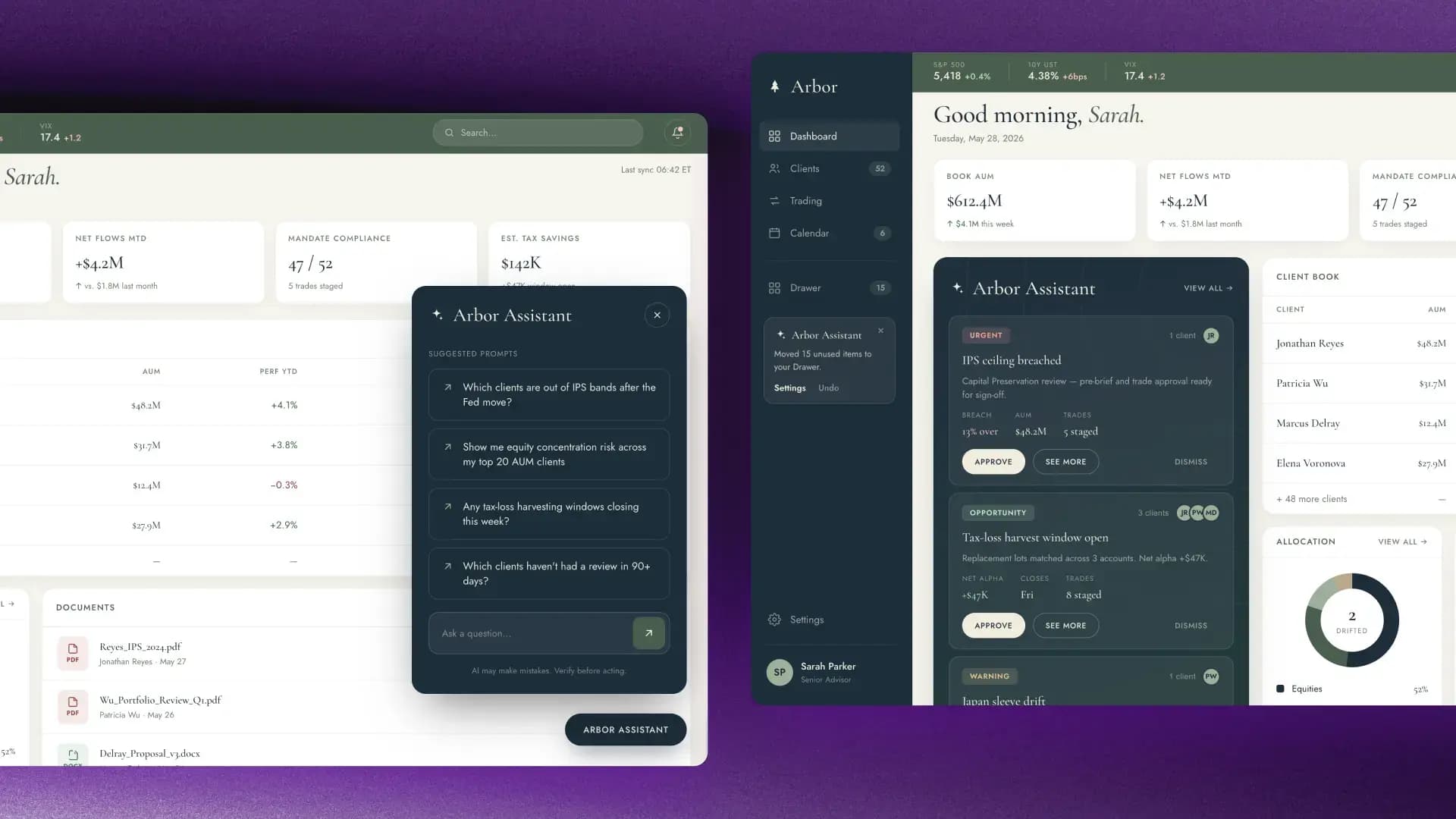
On the left, a traditional chat interface features suggested prompts and a blank input field. It’s capable but reactive. The system is waiting to be asked. The burden of knowing what to request is still on the user.
On the right, the same application is rebuilt around anticipation. When Sarah, the user, logs in, the system has already surfaced what matters: an urgent compliance flag, a time-sensitive opportunity and a trade approval that’s staged for sign-off. Each item is ready to review or approve with a single action.
With anticipatory interfaces, chat can still be available, alongside voice and other input modes, but by default, the interface already knows where to start.
Our team’s research into user desires and expectations for the next generation of AI interfaces found that users are ready for agentic AI that’s anticipatory and multimodal, but on their own terms.
83% of users surveyed want a presence that moves with them across devices and is ambient and voice-forward rather than text-first. 89% want a system that actually knows their routines, their preferences and their context, carried forward from one session to the next, rather than resetting each time. Users are willing to delegate, but only when they can see what the system is doing, so they can step in when it diverges from their intent.
The finding that surprised us most was how fluidly the same person shifts mindsets from task to task. Not a single user in our study maintained one interaction style throughout a session. The person who wanted to delegate a routine task also became a deliberator when the stakes rose, seeking a sounding board rather than an executor. The interface has to move with the user.
How anticipatory interfaces are built: The technical foundations of GenUI
So how do these interfaces actually become a reality? It starts with five foundational layers:
Signals and context for when to act
Ambient data is the driver. Time of day, location, calendar events and even the weather can inform a response before you've thought to ask. Each signal on its own is useful. Together, they're the difference between a system that reacts and one that anticipates.
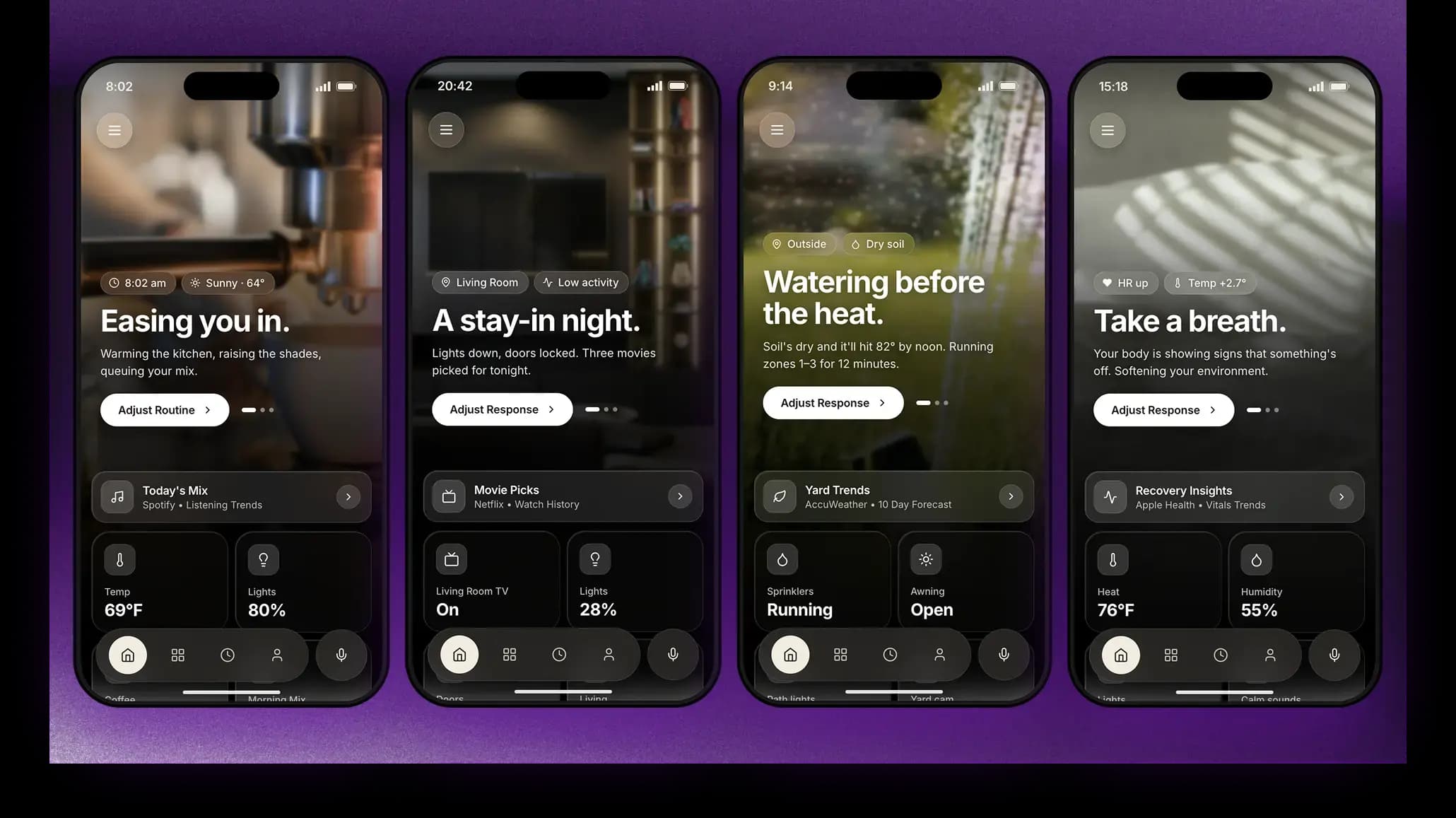
The ambient intelligence needed to move from manual prompts to proactive initiation requires a technical layer that drives triggers based on learned or programmed user preferences.
User data that drives personalization
If signals tell the interface when to act, user data tells it why that action matters in the first place. This is the layer that separates a one-time interaction from one that improves with every session, retaining preferences, behavioral patterns and history. Then, it uses it all to narrow the gap between what the interface shows the user and what they actually need. The more it's used, the more accurate it gets.

Third-party integrations for context outside the product
The third layer acknowledges something the others can't do alone: A user isn't operating only in your product's sandbox. Their calendar lives in Google. Their tasks live in Notion. Their customer data lives in Salesforce. Standards like MCP (Model Context Protocol) enable AI systems to cross these boundaries and pull in context from elsewhere, making the experience feel whole.
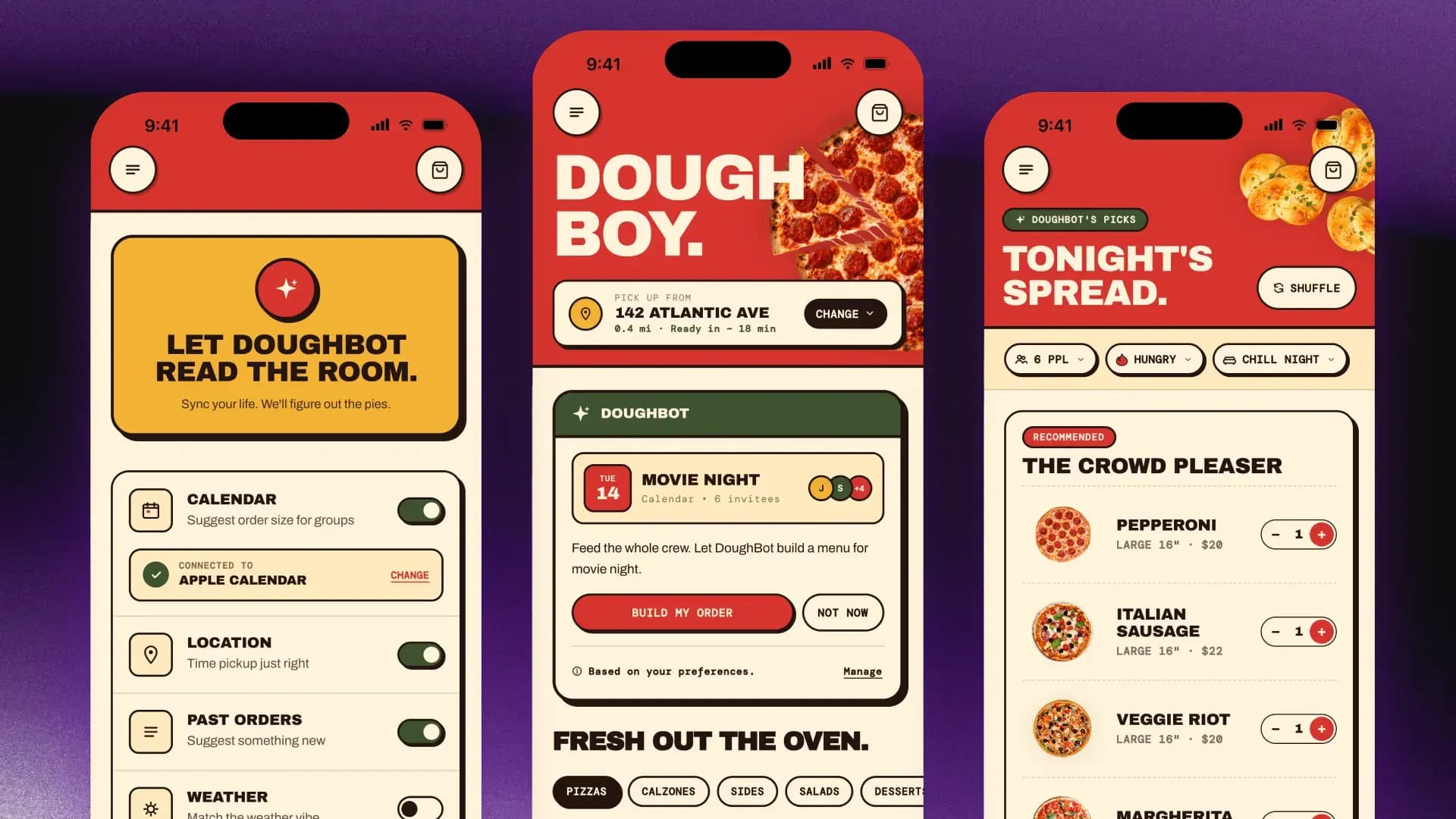
As a trifecta, these first three layers enable customization, allowing users to front-load their identity and connect external apps that make the “second brain” cited in our research.
Design systems that keep AI-generated UI on brand
The fourth layer brings in constraints, giving AI the guardrails it needs to build something that actually feels like your product. Design systems are the blueprint that enables AI to render on-brand, contextually appropriate UI.
Well-structured components, tokens and guardrails give AI the recipe it needs to keep every generated experience feeling native to your product. The AI isn't inventing anything. It's choosing from what's already been designed and assembling it in real time. A card gets filled with the right content, placed in the right dashboard slot and triggered by the right conditions.
Emerging open standards like Google's A2UI are lowering the barrier for any team building anticipatory products.
Agentic execution: Real-time decisions and defined guardrails
The fifth layer is where the system stops reading, starts deciding and then starts doing.
The first four layers give the system what it needs to assemble the right interface for the user, in the moment. The fifth takes a different kind of action: it executes tasks on the user's behalf.
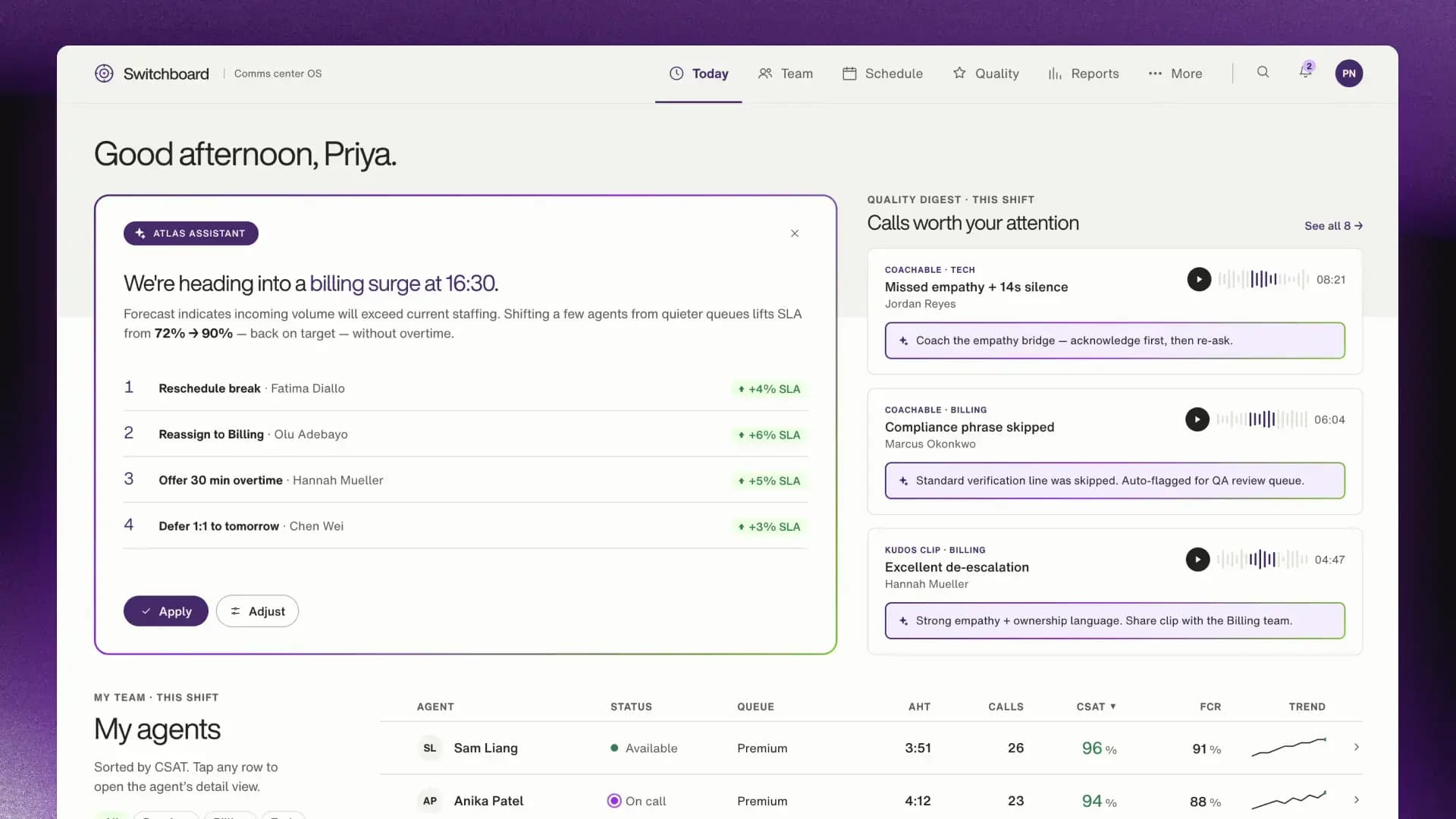
That distinction matters. A workforce management system that assembles a real-time staffing dashboard in response to an incoming billing surge demonstrates GenUI. A system, like the one in the example above, that detects the surge, models the shortfall, identifies which agents to reassign and calculates the SLA impact of each move (and then stages a ready-to-approve action plan before the manager opens their dashboard) is doing something qualitatively different. The former is presentation, the latter is agency.
Major platforms are already moving in this direction. OpenAI's Operator and Google's Gemini Spark are training AI agents to operate apps as a human would, executing complex multistep workflows across multiple products with minimal user configuration. The question for enterprises is how they'll own the experience when the capability reaches their users.
What makes it work, and what makes it safe, is the permission model. The system knows what it can access, what it can execute autonomously and where it should pause. When it hits a confidence threshold or an action outside its permitted scope, it surfaces an approval moment rather than proceeding. That's the mechanism that keeps a user in control of a system that's doing more than they could track manually.
Why user trust is the hardest component in anticipatory interface design
Even the most sophisticated AI interfaces will be dismissed or disabled if trust-building patterns aren't woven in from the start.
A TELUS Digital poll of 1,000 users revealed that 88% of consumers surveyed have personally seen AI make a mistake, and asking, “Are you sure?” rarely leads to a more accurate response. This establishes a challenging baseline for AI apps to overcome in order to earn user trust, especially in industries like healthcare, where the stakes of an AI-originated mistake are high.
Three core principles create a foundation for trust on which all anticipatory interfaces should be built:
Build in transparency, don’t bolt it on
Established UX principles give us a strong foundation, recommending:
- Keep users informed
- Give them control
- Make errors easy to recover from
Clippy broke all three. It acted without explaining why. It couldn't be dismissed without a fight. And when it interrupted your workflow, there was no clean way out. Those three design principles still apply in agentic products. But designing for trust in a system that acts on your behalf requires transparency that runs ahead of the action, not behind it.
The design elements that make this concrete, with action plans, confidence indicators, approval moments, reasoning trails, one-tap undo, etc. are beginning to be codified. Emerging pattern libraries are translating familiar principles into components built specifically for autonomous products.
Earn autonomy: The case for human-at-the-lever over human-in-the-loop
When an interface acts on a user’s behalf, a broken expectation is grounds for disengagement entirely. That's especially true when the system is acting in the world on their behalf. Our user interface research across five industry scenarios found that user trust shifts with context and stakes. The same person who happily delegates travel logistics to an AI wants meaningful, high-fidelity oversight when that AI is managing their finances or health.
We're seeing users move past the traditional human-in-the-loop model toward something more active, what we call human-at-the-lever. Users are willing to grant AI autonomy, but only when they feel they're directing the ship by setting the context, preferences and guardrails up front and then monitoring as the system executes.
The ability to pause, redirect, override or adjust is the mechanism that makes delegation feel safe.
Design with HEART: A framework for human-centered AI
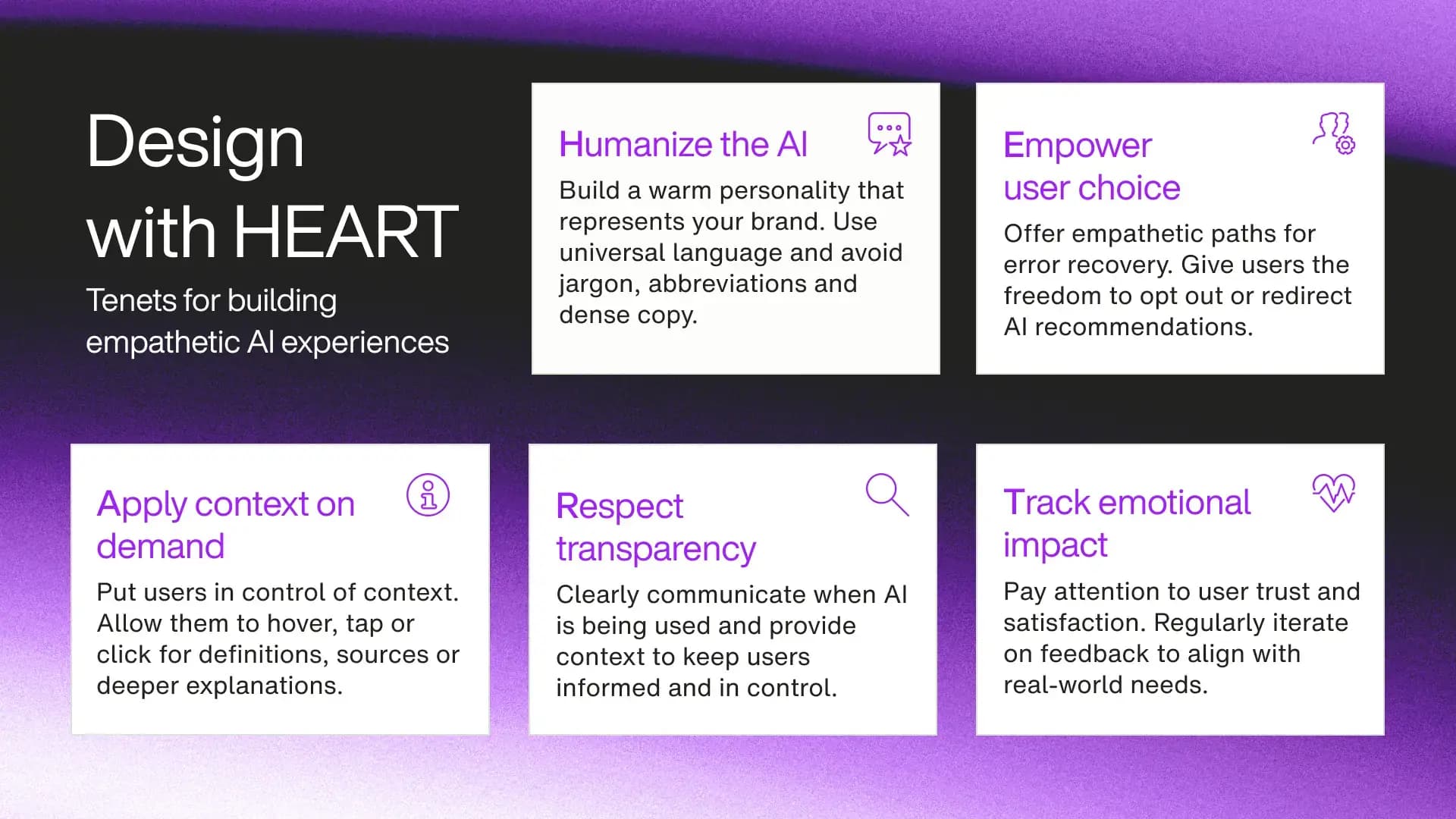
Our proprietary HEART framework, developed by TELUS Digital Senior Manager, Design Robbie McCown and his team, is how we design for trust, developed for building AI experiences that feel human, not just intelligent
It starts with how the interface presents itself: warm, plain-spoken and approachable enough that a first-time user is willing to engage. From there, it's about control, giving users a frictionless way to opt out, redirect or disagree with AI guidance at any pace they're comfortable with. Context is surfaced on demand rather than all at once, because noisy is never helpful. Transparency is made visible through the content and design markers that show users what the AI did and why. Finally, continuous sentiment-tracking is how the interface learns when to act and when to stay out of the way.
Together, these principles are how the five technical layers earn user trust over time, ensuring consistent AI behavior across every interaction.
Is your product ready for anticipatory AI? A test for what you're missing
AI is already on the roadmap at most organizations. What hasn't been decided is whether those investments build on each other or just ship features that stay exactly as smart as the day they launched.
Here's a useful test. Open your product and count how many actions still require the user to initiate something that the system should already know they need. Every one of those is friction that the system is choosing not to remove. That number is your gap. That's where the five layers start.
The organizations that close it will build something competitors can't easily replicate: a product that gets more useful the longer someone uses it. Every interaction teaches the system something, and over time, that narrows the distance between what users see and what they actually need. That relationship compounds in ways a static app never can.
Building it starts with the scaffolding. Earning it requires trust.
Nicole Cacchiotti
Senior Product Designer, TELUS Digital
Nicole Cacchiotti is a senior product designer at TELUS Digital with a background spanning start-ups and enterprise across highly regulated industries. She sits at the intersection of strategy and human-centered design, and enjoys shaping systems that improve day-to-day lives. Currently, she is focused on designing AI-native experiences that earn user trust.
Nicole Cacchiotti is a senior product designer at TELUS Digital with a background spanning start-ups and enterprise across highly regulated industries. She sits at the intersection of strategy and human-centered design, and enjoys shaping systems that improve day-to-day lives. Currently, she is focused on designing AI-native experiences that earn user trust.
Katie Krol
Lead Product Researcher, TELUS Digital
Jamie Young
Design Lead, TELUS Digital