The accelerating GenUI ecosystem: MCP Apps, OpenAI’s Apps SDK and Google A2UI
Adam Shea
Sr. Director, Engineering

Key takeaways
- Generative UI (GenUI) allows AI agents to render interactive charts, forms and tools directly in the conversation, transforming LLMs from passive responders into active, visual workspaces.
- While evolving quickly, three distinct philosophies dominate the market:
- Apps SDK: The "walled garden" focused on massive reach and distribution within OpenAI’s ecosystem.
- MCP UI: The "open standard" focused on vendor-neutrality and building tools that work across any AI client (like Claude or VS Code).
- A2UI: The "native performer" from Google, focused on high-performance, cross-platform rendering for mobile and desktop using declarative blueprints.
- GenUI requires developers to stop thinking about building static pages and start thinking about "contextual UI" — interfaces generated on the fly based on the specific user intent and state of the conversation with AI.
- Choosing a framework is a strategic trade-off. Enterprise leaders must decide between the immediate audience of hundreds of millions of ChatGPT users versus the long-term flexibility of an open standard that prevents platform lock-in.
When I wrote about building our first ChatGPT proof of concept weeks after OpenAI announced their Apps SDK, I was focused on the technical implementation details — how to wire up React components, defining the prompts and tools. What I didn't fully appreciate at the time was that we were working with an emerging approach to AI interfaces: generative UI.
Watch how chat evolves with Apps SDK in this promotional video from OpenAI.The concept is straightforward. Instead of AI agents responding only with text, they can render interactive interfaces. Need to visualize data? The agent generates a chart. Want to book a meeting? It creates a calendar widget. It's a shift from a text-only world to one with interactive and intentional user experiences.
Open AI’s competitors in the space are A2UI, released by Google in December 2025, and MCP Apps, built by the developer community. Here's what's becoming clear: Regardless of which framework or standard ultimately dominates, the shift toward GenUI is accelerating and irreversible. Users don't want to parse walls of text when they could interact with a chart, form or dashboard. As our research revealed in The future of AI interfaces, the text-only experience that defined the first generation of LLM interfaces isn't the experience users want long-term.
The question isn't whether GenUI will become standard — it's which approach will shape how we build these experiences.
The differences between these frameworks come down to different priorities. Each framework represents a different answer to how agent-generated interfaces should work. These early implementations will influence how we build AI experiences going forward. To determine which path aligns with your organizational goals, we will evaluate each approach’s distinct offerings and the critical tradeoffs they require for long-term enterprise scalability.
The generative UI contenders: A quick overview
Apps SDK: Proprietary to OpenAI’s platform
OpenAI's Apps SDK, announced in October 2025, is a web-centric framework that extends MCP to support custom UI components rendered inside ChatGPT conversations. Developers can build with React components or web components. While the architecture is web-based, these apps work across ChatGPT's desktop and mobile experiences. The approach is JavaScript-native and proprietary to OpenAI's platform. Apps built with this SDK run exclusively in ChatGPT and benefit from OpenAI's curated app store, contextual discovery and recommendation algorithms that surface apps to ChatGPT's 800M+ users.
MCP Apps: Extension of the open MCP standard
MCP Apps is the first official MCP extension and leverages the existing, embedded resources specification with a new UIResource interface. Companies like Shopify have implemented it in production, and as of January 2026, ChatGPT officially supports MCP Apps alongside its proprietary Apps SDK, making it possible to reach ChatGPT users through either approach.
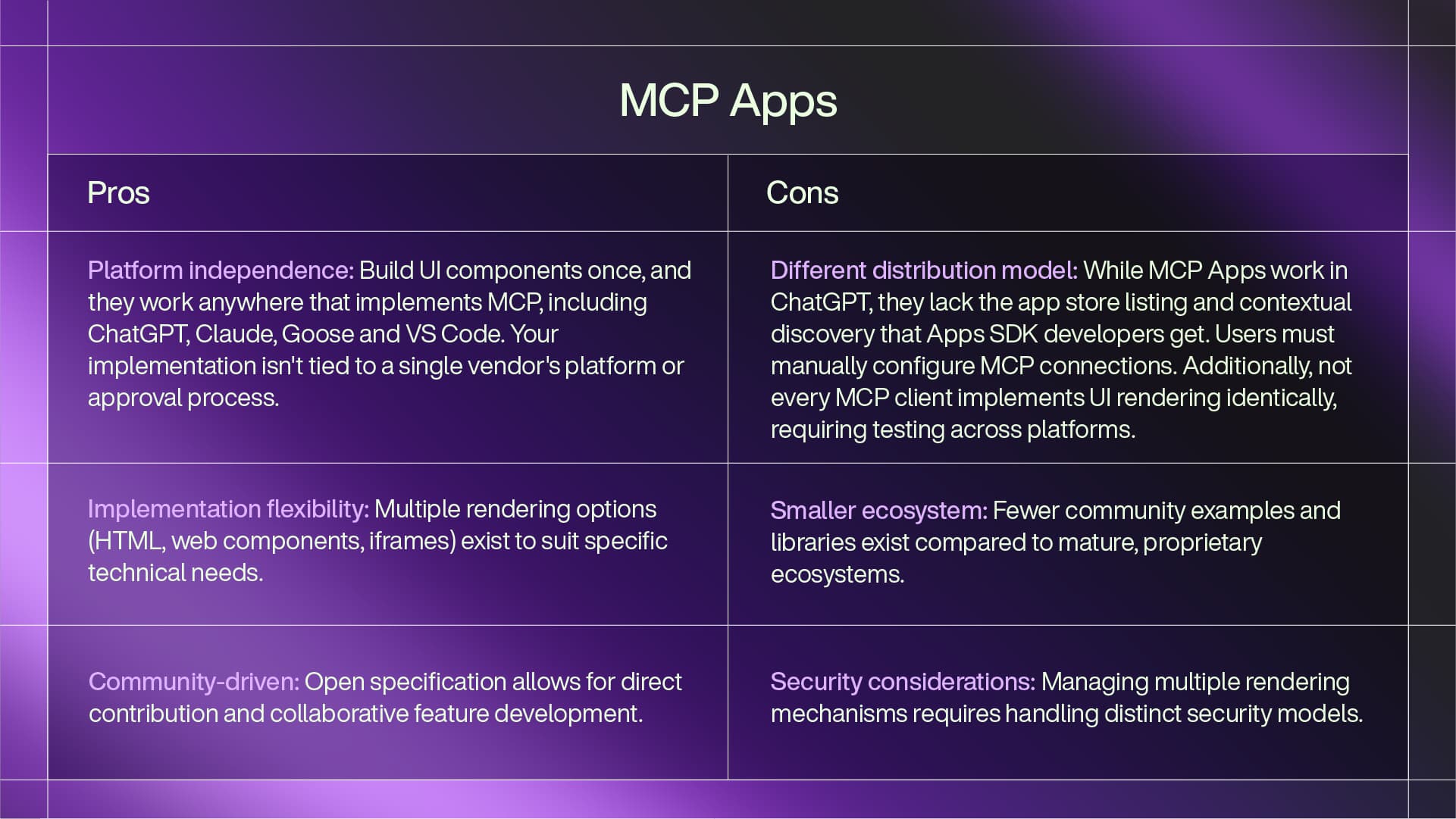
MCP servers can return interactive UI components instead of just text or data, and these render in any MCP-compatible client, including Claude, Goose and VS Code. The framework supports three rendering mechanisms: inline HTML for simple components, web components for reusable custom elements and external URLs loaded via iframes for more complex applications. Because it's built as an extension to the open MCP standard, any client that implements the protocol can render these interfaces.
A2UI: Google’s native-first agent-to-user interface
Google's A2UI is designed to be cross-platform and native-first. Unlike the web-centric approaches of OpenAI and MCP Apps, A2UI uses a specialized format for representing updateable, agent-generated UIs that can render across web, mobile and desktop environments. Google has released it as an open standard with reference implementations and renderers, backed by Google's resources and development.
GenUI architecture and philosophy comparison
Understanding these frameworks requires looking beyond their marketing materials to examine the fundamental architectural choices each makes and the tradeoffs those choices impose. To help you navigate this complexity, we’ve identified five core comparison points that define the performance, flexibility and longevity of a GenUI implementation.
1. The “web versus native” divide
The main difference in how these frameworks approach rendering comes down to web-centric versus platform-agnostic (native) design. Both Apps SDK and MCP Apps use web technologies — React components, web components, HTML, CSS and JavaScript. This fits their target environments: browser-based chat interfaces and desktop applications built on web stacks like Electron.
A2UI takes a different approach. It's designed to be rendering-agnostic. Rather than shipping HTML and JavaScript, A2UI uses a declarative format that describes what the UI should look like and how it should behave. Client applications then render this description using whatever technology makes sense for their platform — native iOS components on mobile, web components in browsers or native desktop widgets. It's similar to server-side rendering, but instead of a template engine generating markup, an LLM generates the markup based on context and user intent. The agent sends a description of the interface, and the client renders it using the appropriate technology for that platform.
Each approach has tradeoffs:
- Web-centric frameworks give you immediate access to the web ecosystem — npm packages, CSS frameworks and familiar debugging tools.
- Platform-agnostic approaches can offer better performance and native platform integration, but require renderer implementations for each target platform.
2. Open standard versus platform control
A tension exists between open ecosystems and proprietary control, a dynamic that can dictate how quickly an organization can achieve widespread adoption without incurring technical debt.
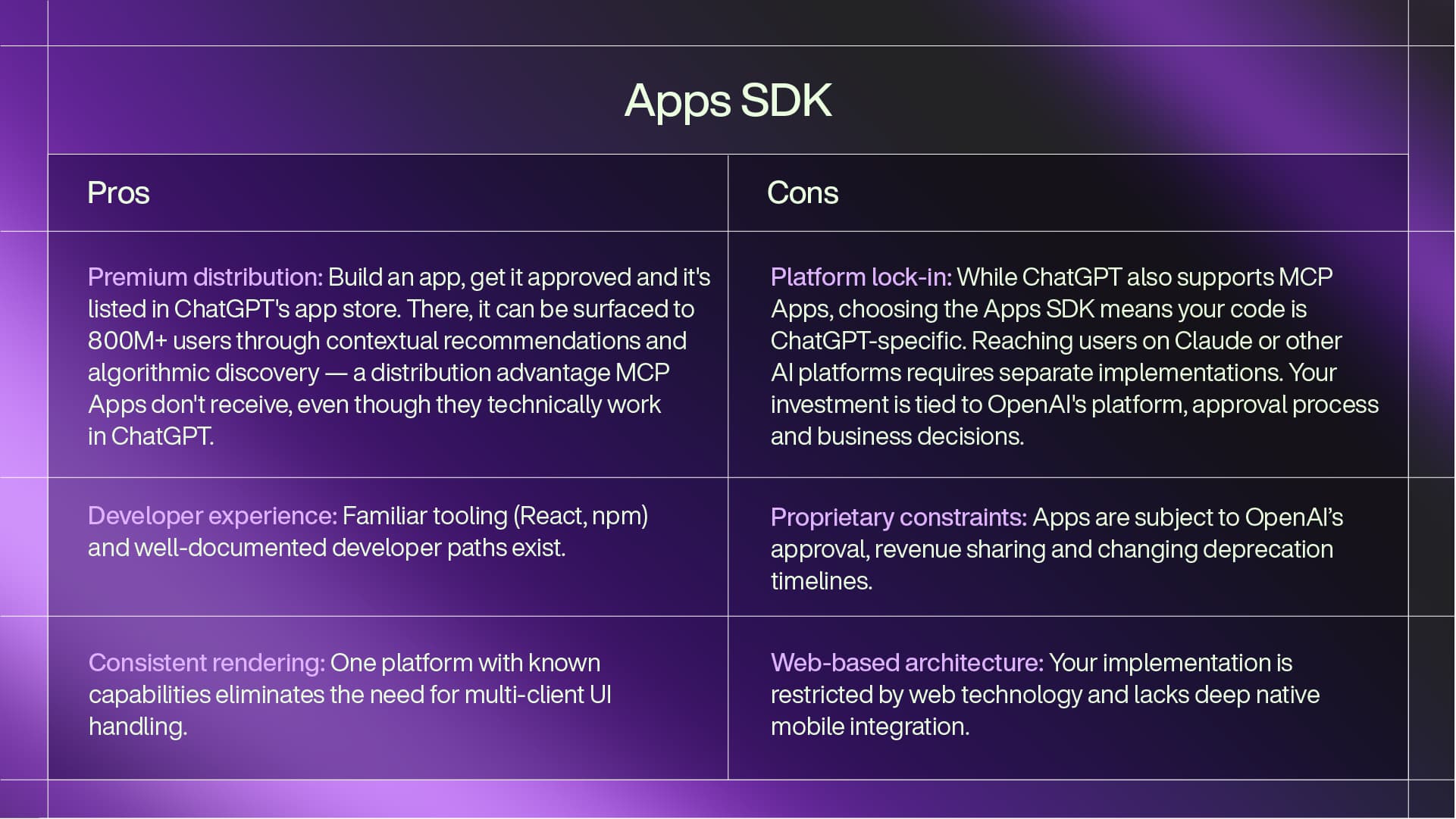
OpenAI's Apps SDK is proprietary. You build for ChatGPT, distribute through ChatGPT and your app runs exclusively in ChatGPT. There's no portability to other platforms. However, ChatGPT has hundreds of millions of users, so the platform lock-in comes with access to significant distribution. Your app can be surfaced to users based on their queries, appearing when it's relevant. So, the tradeoff is whether to accept platform constraints in exchange for user reach.
An important nuance: ChatGPT now supports both its proprietary Apps SDK and MCP Apps. However, the user experience differs significantly, which I’ll explain in detail below.
MCP Apps benefits from the Model Context Protocol's existing ecosystem. Anthropic's Claude Desktop supports it, and the protocol has hundreds of MCP servers already published. MCP Apps extends this existing foundation — any application that already supports MCP can add UI rendering capabilities. So, adoption builds on existing MCP infrastructure.
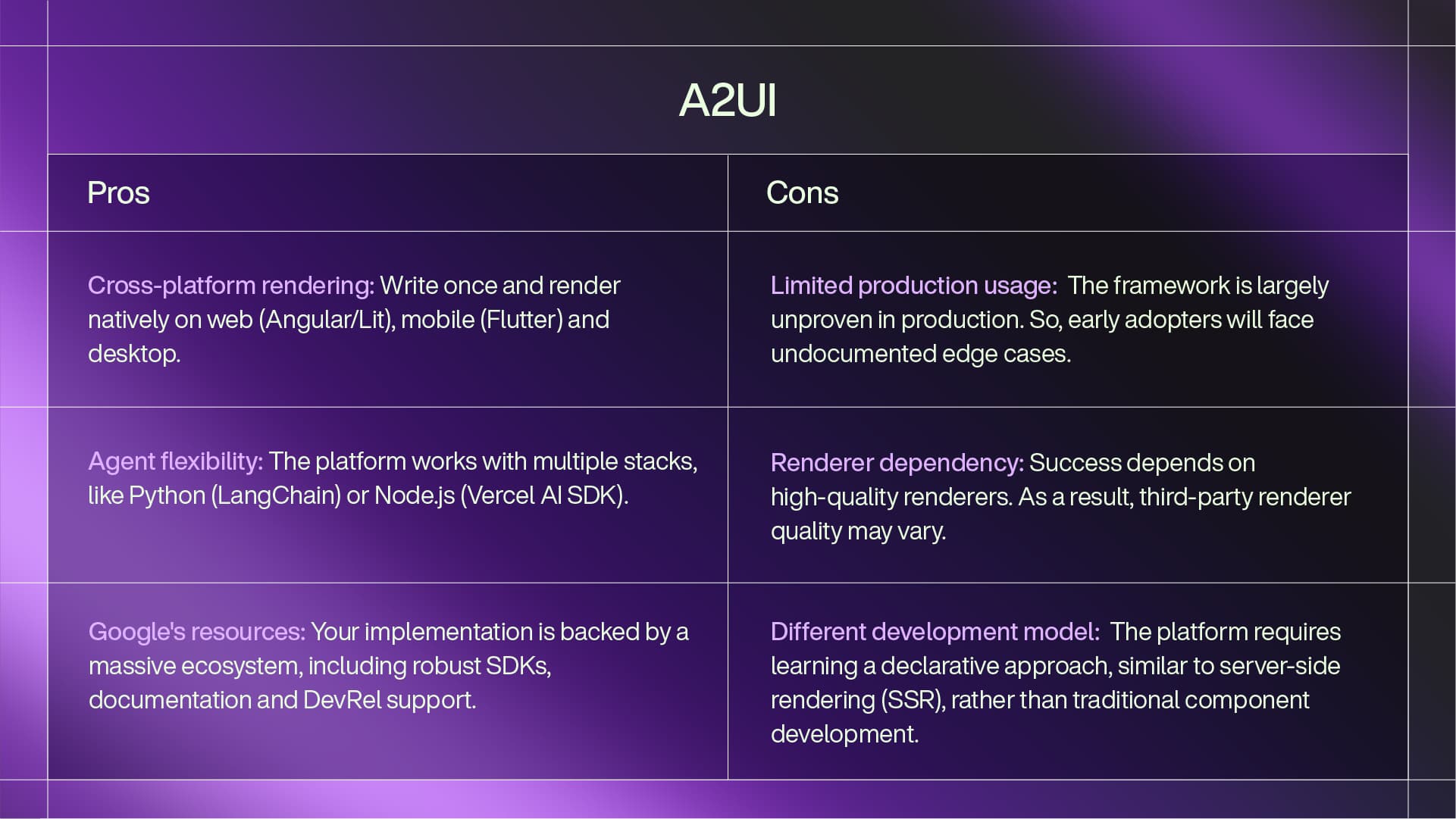
Like MCP Apps, A2UI has open standards, but, as the newest option, has limited production adoption so far. On the rendering side, they support Flutter for native mobile experiences, plus Lit and Angular for web applications. React support is coming soon. On the agent side, A2UI offers flexibility: Python developers can use Google's ADK, LangChain or custom implementations. Node.js developers also have options, including the A2A SDK, Vercel AI SDK or custom solutions.
A2UI’s multi-framework approach means developers can use familiar tools, but this requires renderer implementations across platforms and developer tooling. While Google is investing resources to build this ecosystem, that doesn't guarantee developer adoption.
3. The essential developer consideration: familiarity versus flexibility
The true cost of a GenUI framework is measured in developer velocity and long-term maintainability, forcing a choice between the immediate efficiency of familiar web standards and the future-proof potential of declarative, AI-native architectures.
For developers comfortable with modern web development, Apps SDK uses familiar tools. You write React or web components, use standard tooling like npm and webpack and deploy. The Apps SDK includes a UI component library for consistency with ChatGPT's design language.
MCP Apps offers flexibility through its three rendering mechanisms:
- Inline HTML works for simple components.
- Web components provide encapsulation for reusable elements.
- Iframes allow integration of complex third-party tools. This flexibility requires consideration of security boundaries and rendering contexts.
A2UI uses a different approach. Instead of writing components directly, you describe interfaces in a declarative format that renderers interpret. This is similar to SwiftUI or Jetpack Compose rather than React. The approach requires learning a new model, with the tradeoff being cross-platform portability.
4. State management and updates
The efficacy of a generative interface relies on its ability to maintain state across agent-driven updates, ensuring that as the AI evolves the UI in real-time, the user experience remains coherent, responsive and free of jarring transitions.
Apps SDK uses React's state management patterns. Components manage their own state, and the SDK provides hooks for communicating with the ChatGPT backend. This follows standard React patterns.
MCP Apps is protocol-focused. The server can push updated UI resources to the client at any time, and the client implementation handles re-rendering. This provides flexibility but requires coordination between server and client.
A2UI's format includes support for updateable interfaces. The specification includes primitives for partial updates, allowing agents to modify specific parts of the UI without re-rendering everything. This approach has less production usage than the other two frameworks.
5. ChatGPT-specific implementation differences
While ChatGPT now supports both the Apps SDK and MCP Apps, there are subtle technical differences in how they function within ChatGPT:
Apps SDK exclusive features
- Browser-backed widgets: Access to browser APIs and more sophisticated client-side capabilities through ChatGPT's sandboxed iframe environment.
- Enhanced metadata properties: OpenAI has extended the widget metadata with ChatGPT-specific properties for finer control over rendering and behavior.
- Integrated authentication: Built-in OAuth flows and session management handled by ChatGPT's infrastructure.
- App store integration: Automatic discovery, contextual surfacing and recommendation algorithms that present your app to relevant users.
MCP Apps in ChatGPT
- Manual connection required: Users must explicitly configure MCP server connections; there's no automatic discovery mechanism.
- Standard MCP protocol: Uses the open MCP specification without ChatGPT-specific extensions.
- Cross-client compatibility: The same MCP App works identically in Claude, Goose, VS Code and ChatGPT.
- No app store presence: The apps won't appear in ChatGPT's app marketplace or benefit from algorithmic recommendations.
So, what’s the practical implication of these differences? If ChatGPT is your primary distribution target and you want maximum reach, the Apps SDK provides superior user acquisition through its discovery mechanisms. However, if you need to support multiple AI platforms with a single codebase, MCP Apps offers portability at the cost of ChatGPT's premium distribution features.
“Pros and cons” summary of the leading GenUI frameworks
Here's what each framework offers and the tradeoffs it requires for implementation decisions.
Apps SDK
MCP Apps
A2UI
What these considerations mean for enterprise AI strategy
For consumer apps, the framework choice often comes down to the platform your users are on. Enterprise AI has different requirements. You're building systems that need to work reliably over the course of years, integrate with existing infrastructure and adapt as the AI landscape changes.
The platform independence question
For enterprise platforms like Fuel iX™, independence is important. Fuel iX is designed to manage generative AI applications across multiple foundation models, data sources and tools. Locking into a single vendor's UI framework, as with Apps SDK, creates vendor dependency.
The open standards (MCP Apps and A2UI) address this concern. When your organization wants to support multiple AI platforms with consistent experiences, MCP Apps provides portability without maintaining separate implementations for each vendor. Since MCP Apps extends an existing protocol, you can build UI capabilities on the infrastructure you might already be implementing for tool integration. If you're already using MCP servers to connect AI agents to your enterprise systems, adding UI rendering builds on that foundation.
A2UI's cross-platform approach fits enterprises with diverse client environments — web dashboards, mobile apps and desktop tools. However, the lack of production deployments means early adopters will be establishing patterns rather than following established practices.
Future-proofing GenUI investments
The GenUI landscape will change. New frameworks will emerge. Current options will evolve. Standards might consolidate or fragment further. So, the enterprise approach is to build abstractions that allow adaptation. This might include:
- Wrapper layers that translate your internal UI descriptions into whatever format the target platform needs.
- Multi-framework strategies where you support Apps SDK for distribution, but maintain MCP Apps implementations for flexibility.
- Renderer-agnostic architectures that separate your business logic from UI rendering, making it easier to change frameworks as the landscape evolves.
The architectural decisions matter more than the specific framework choice. Tightly coupling your AI experiences to a specific UI framework limits future flexibility. Building with abstraction and portability allows you to evolve as the ecosystem matures.
Technology meets experience
From building with these technologies, I've found that the framework choice is also less important than understanding what experience you're trying to create.
You can build poor user experiences with any framework, and you can build useful products with different technical choices. The important factors are understanding both the "how" and the "what."
The "how" is engineering: understanding these frameworks well enough to build reliable, performant, secure implementations. Know when to use inline HTML versus web components. Understand state management patterns. Handle edge cases and errors properly.
The "what" is understanding the experiences your customers want and need. Which interactions should be conversational versus visual? When does a generated chart add value versus creating cognitive overhead? How do you maintain trust when an AI is dynamically generating interfaces? These are product and design questions, not just technical ones.
What to watch
This is a fast-moving space. What's true today about limitations or advantages may not hold in six months. As this space evolves, pay attention to:
- Renderer quality and completeness for A2UI across platforms — does the reality match the promise?
- Adoption signals from major AI platforms — which frameworks are they supporting?
- Developer tooling maturity: SDKs, debugging tools and component libraries.
- Security models as these frameworks mature and edge cases emerge.
- How ChatGPT balances its dual support — will OpenAI eventually offer app store discovery for MCP Apps, or will the Apps SDK remain the premium distribution path?
- Feature parity evolution — will the technical differences between Apps SDK and MCP Apps narrow or widen over time?
The GenUI wars are just beginning. Choose your framework based on your constraints and goals, but build with flexibility in mind.
Where TELUS Digital fits
TELUS Digital works with organizations on both the technical implementation and the product strategy for GenUI.
On the technical side, we build with these frameworks. As I detailed in my previous article, we went from OpenAI's Apps SDK announcement to a working proof of concept in 48 hours. We understand these technologies through active implementation.
We also provide product research and UX capabilities to validate what works for users. We can help you run experiments to understand which GenUI patterns work for your audience. We can prototype multiple approaches and test them with real users before committing to a technical direction. We can help you evaluate the strategic implications of framework choices alongside implementation considerations.
Reach out to speak with an expert to help you wherever you are in your AI journey.